

User Manual
Getting Started
Welcome to Volta — Ecovolt's smart plug. This guide walks you through setting up the Base web app, creating your account, adding your plugs, and using the key features.
🎥 Watch: Onboarding
Step 1 — Setting Up Base
Base runs in your browser, but you can add it to your home screen so it works like a regular app.
- Open your browser and go to base.ecovolt.ai.
- Tap the browser's Share icon (found at the top of your screen).
- Select "Add to Home Screen".
- Confirm by tapping "Add".
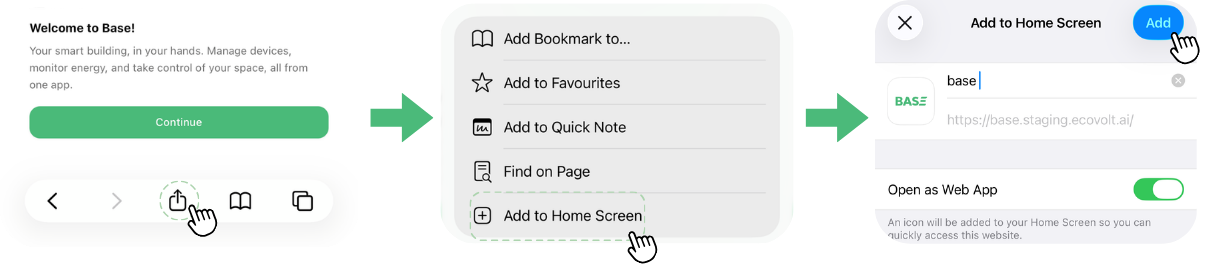
Adding Base to your home screen.
Base now appears on your home screen and opens like a native app.
Next steps
- Creating an Account — sign up or log in to Base
- Adding Plugs & Rooms — register your plugs and organise them
- Using Features — Eco Guard, Wi-Fi setup, and schedules
Last modified on